
Marketers: 3 Google Ads conversion tracking steps before changing bids
Checklist for marketers: set one primary Google Ads conversion, enable enhanced conversions, test with Tag Assistant, then scale bids.
Conversion tracking records what happens after someone clicks your ad, whether that's a form submit, a phone call, or a completed sale, and Smart Bidding can't optimise without it.


TL;DR: Quick Answer
Checklist for marketers: set one primary Google Ads conversion, enable enhanced conversions, test with Tag Assistant, then scale bids.
Conversion tracking records what happens after someone clicks your ad, whether that's a form submit, a phone call, or a completed sale, and Smart Bidding can't optimise without it. Do three things before touching anything else: create one primary, native Google Ads conversion action, turn on enhanced conversions, and run a Tag Assistant test to confirm it fires correctly. Test that setup before you change a single bid or budget.
TL;DR:
- Using a single primary conversion action and enabling enhanced conversions can increase reported results by up to 15 percent.
- Accurate tracking requires confirming tags fire correctly, linking GA4 properly, and testing conversions before scaling campaigns.
- Duplicate tags and multiple primary conversions hinder Smart Bidding's effectiveness by diluting signals and inflating data.
- Implementing server-side tagging and offline uploads is crucial for capturing long-term and off-site conversions, especially in complex sales processes.
- Regular audits of conversion setup, GCLID capture, and data consistency between Google Ads and CRM are essential for reliable campaign optimisation.
What can conversion tracking google ads actually measure?
Google Ads conversion tracking can measure almost any business outcome, but only if you classify it correctly from the start. Get this wrong and you're not just missing data, you're feeding Smart Bidding noisy signals that push your budget towards the wrong actions.
Here's what you're working with:
- Page loads (destination-based): typically a "thank you" page view after a purchase or lead form, tracked with a simple snippet or URL match.
- Form submissions: the most common lead-gen conversion, ideally fired on the confirmation event rather than the page load, so partial or abandoned submissions don't count.
- Button clicks: used for actions like "Request a Quote" or "Add to Cart" where there's no separate confirmation page.
- Phone calls: either call extensions clicked on the ad itself, or calls from your website tracked with a forwarding number.
- App installs and in-app events: purchases, sign-ups, or level completions inside a mobile app, usually tracked through Google's SDK or a mobile measurement partner.
- Offline and CRM conversions: sales confirmed days or weeks later, uploaded back into Google Ads once a lead becomes a customer.
URL-based tracking (a specific "thank you" page loading) works fine when the action is binary: someone either reached that page or they didn't. Code-based tracking becomes necessary the moment you need to pass a dynamic value, like the actual purchase amount or a transaction ID, because URL rules alone can't capture that detail.
The primary versus secondary distinction matters more than most advertisers realise. Mark your revenue-driving actions (a completed sale, a qualified lead form) as primary, since those feed Smart Bidding directly. Micro-engagements like newsletter sign-ups, PDF downloads, or scroll-depth events belong as secondary. They're worth watching for insight, but they shouldn't influence how your bidding algorithm spends money.
How do you set up a Google Ads conversion tracking action?
Setting this up correctly the first time saves you weeks of messy data later. Here's the path from a blank account to a working, tested conversion.
1. Create the conversion action. In Google Ads, go to Tools & Settings → Conversions → the plus button. Name it something you'll recognise in six months (not "conversion action 1"). Set the value (fixed or dynamic), the count setting (one per click versus every click), your conversion windows, and your attribution model. Mark it primary or secondary based on the guidance above.
2. Choose your implementation method. You've got three real options:
- URL-based tracking is the fastest to deploy, good for simple thank-you-page setups, but it breaks the moment your funnel changes or you need dynamic values.
- Manual code snippet gives you full control over value and transaction ID capture, but it means editing site code directly, which is slower and riskier if your dev team is stretched thin.
- Google Tag Manager is the option we recommend for almost every account. It centralises your tags, makes updates without a developer, and gives you a Preview mode for testing before anything goes live.
3. Link GA4 and decide what to import. Connect your Google Ads and Google Analytics 4 accounts, then choose which GA4 events to bring across as conversions. The rule we follow: use native Google Ads tags for your primary, bidding-relevant actions, and import GA4 events only for secondary, analytics-only metrics. Setting up conversions through GA4 is genuinely useful for filling measurement gaps, but importing the same event you're already tracking natively causes duplicate conversions, which artificially inflates your numbers and confuses Smart Bidding. Our guide to linking Google Ads and GA4 walks through the linking flow step by step if you want the screenshots.
4. Test everything before you trust it. Use GTM's Preview mode to confirm the right tag fires on the right page. Run Google's Tag Assistant to see exactly what data each tag sends. Check the Diagnostics tab inside Google Ads for flagged issues on your conversion actions, and confirm enhanced conversions show a status of "Recording conversions" rather than "No recent conversions." Before you start, confirm permissions: you'll need Admin access in Google Ads and Edit access in GA4, or you'll hit a wall halfway through.
Pro Tip: Complete a test conversion yourself and watch it land in Google Ads within a few hours. If it doesn't show up as "recorded" within 24 hours, stop and fix the tag before you launch or scale any campaign.
If your business relies on phone enquiries rather than form fills, the setup differs and may require separate guidance. Our walkthrough for call and enquiry tracking covers forwarding numbers, call extensions, and the timing thresholds Google uses to count a call as a conversion.
What do enhanced conversions and Consent Mode V2 change?
Once your basic tracking works, three upgrades determine how much of your real conversion volume Google Ads actually sees. Cookie restrictions and browser privacy settings quietly erase a meaningful share of conversions from your reports, and each of these tools recovers a different slice of that loss.
Enhanced conversions use hashed first-party data (email, phone number, name and address) to match a completed conversion back to the original ad click, even when a cookie has been blocked or deleted. Google's own guidance on enhanced conversions for leads confirms this recovers attribution that would otherwise vanish, and it's particularly valuable for B2B and lead-gen campaigns where the sale often happens days after the click. You can enable it through automatic detection on your site's existing form fields, a GTM variable mapping, or a server-side implementation for tighter control.
The numbers back this up: advertisers commonly see a 5 to 15% increase in reported conversions simply from turning on enhanced conversions, with no other changes to campaigns, budgets, or targeting.
Consent Mode V2 matters if you operate in a market with cookie consent requirements. Your consent management platform communicates the visitor's choice to Google, and even when someone declines cookies, Consent Mode sends a cookieless ping that Google Ads can use for statistical modelling. Without it configured correctly, declined visitors simply disappear from your reporting entirely. Our notes on Consent Mode and GTM setup cover the CMP integration side in more detail.
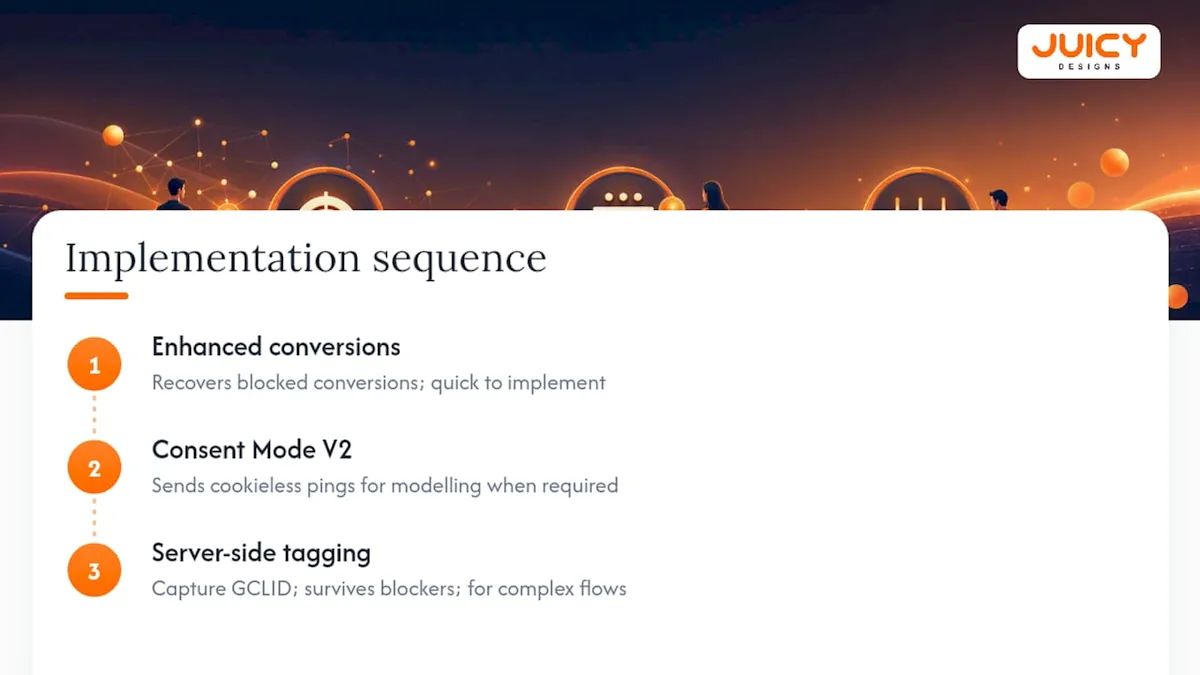
Server-side tagging and offline conversion uploads solve a different problem: conversions confirmed after the click, off-site, or deep in a sales pipeline. This is when you need to capture the GCLID (or WBRAID/GBRAID for app conversions) at the point of lead submission, store it against that record in your CRM, and upload the confirmed conversion later via CSV or API once the sale closes. Server-side tagging also routes data through infrastructure you control, which helps it survive ad blockers and browser tracking limits that client-side tags can't.
The order to tackle these in: enhanced conversions first, since it's the fastest to implement and delivers the clearest lift. Consent Mode V2 next, if you're required to run one. Server-side tagging last, reserved for accounts with genuinely complex or high-volume conversion flows where the extra engineering overhead pays for itself.
Why is my conversion data wrong, and how do I fix it?
Most broken conversion tracking traces back to one of five repeatable mistakes. Here's the audit we run on almost every account we take over.
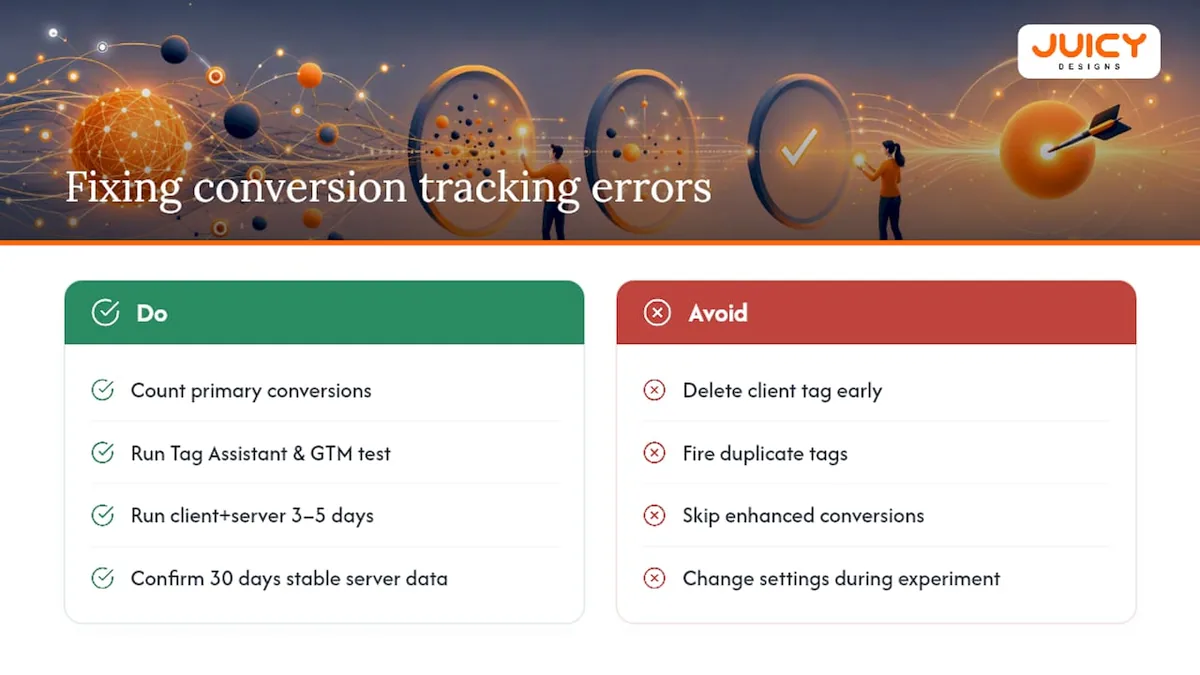
1. Too many primary conversions. Every primary action competes for the same bidding budget. Four or five primary conversions spread your Smart Bidding signal so thin it can't optimise for any of them properly.
2. Duplicate tags. Client-side tracking firing alongside an imported GA4 event for the same action inflates your numbers, often by a lot, and nobody notices until the cost-per-conversion looks suspiciously good.
3. Missing enhanced conversions. If it's not enabled, you're reporting fewer conversions than actually happened, which understates ROAS and can make a profitable campaign look like it should be paused.
4. Removing tags too early during a server-side migration. Delete a client-side tag before you've confirmed server-side is stable, and you can lose data entirely with no way to recover it.
5. No GCLID capture. Without it, offline and CRM conversions can never be matched back to the ad click that generated them.
Diagnosing these is faster than fixing bad data after the fact. Count how many conversion actions are marked primary. Run Tag Assistant and GTM Preview while you complete a real test conversion. Compare what Google Ads reports against your actual CRM numbers for the same period. Check the enhanced conversions diagnostic and the Diagnostics tab for flagged warnings.
If you're mid-migration to server-side tagging, run both systems in parallel for three to five days before pausing the client-side tag, and don't delete it outright until you've confirmed 30 days of stable server-side data.
Pro Tip: Never touch conversion settings mid-week during a bidding experiment. Smart Bidding needs a stable learning phase of about one to two weeks, and Google is explicit that frequent changes to budgets, targets, or conversion goals during that window resets learning from scratch. Make your fix, then check results at the 72 hour mark and again at 30 days, not before.
What does a practitioner actually check first?
Most conversion tracking problems we find at Juicy Designs come down to three checks: is there exactly one clear primary conversion, is enhanced conversions live and recording, and does the Google Ads number match the CRM number for the same week. Get those three right and Smart Bidding has something honest to optimise against.
We've built our Google Ads management approach around fixing this before we touch a single bid, and if you need fresh creatives after getting conversion tracking right, you can try this Google Ads Generator: RSA Headlines & Descriptions to improve your ads, which is part of why our clients average a 4.8x return on ad spend, nearly double the industry norm. If you don't have dev resources on hand, that's the point to bring in outside help rather than guessing at fixes for another quarter.
, Cobus
Should you fix this yourself or bring in an agency?
If you've read this far and you're still not confident your conversion data is clean, that's the honest signal to hand it off. An agency earns its keep here specifically when you lack in-house dev resources, when you need server-side tagging done properly, when offline conversion imports need to tie back to a CRM, or when you simply need someone watching the account week to week rather than once a quarter.
A thorough Google Ads audit includes checking conversion signals line by line: which actions are primary, whether enhanced conversions is recording, and whether GCLID capture works end to end from ad click to closed sale. This service is offered without long-term contracts and with pricing suitable for the South African market, for businesses of various sizes.
If you'd rather have a second pair of eyes confirm your setup before you scale spend, book a free Google Ads audit with our team and we'll tell you exactly what's broken and what to fix first.
Where to check the official documentation
For exact implementation steps, keep Google Ads Help bookmarked alongside the GA4 linking and enhanced conversions docs. Use Tag Assistant and the Google Ads Diagnostics tab to validate every change before you trust the numbers.
Sources
- Google Ads server-side tracking: why it matters and how to implement it , Able Customer Data Platform
- Google Ads Conversion Tracking Setup 2026: The Complete Guide (GA4 + Enhanced Conversions + Consent Mode)
FAQ
Why do you need conversion tracking in Google Ads?
Without it, Smart Bidding has no signal to optimise against, and you're paying for clicks with no reliable way to know which ones turned into sales, leads, or calls.
How do you set up Google Ads conversion tracking?
Create a conversion action under Tools & Settings → Conversions, choose URL-based, manual code, or Google Tag Manager for implementation, then test with Tag Assistant before trusting the data.
What's the fastest way to set up conversion tracking?
URL-based tracking on a thank-you page is the quickest method, though Google Tag Manager is the more maintainable choice for most growing accounts.
What does conversion tracking actually mean?
It means recording a specific action, a sale, a form fill, a call, that happens after someone clicks your ad, so you can measure and optimise campaign performance against real outcomes rather than clicks alone.
Does enhanced conversions replace regular conversion tracking?
No, it works alongside your existing setup by matching hashed first-party data to recover conversions lost to cookie restrictions, typically lifting reported conversions by 5 to 15%.
Recommended
- Google Ads Bidding Strategies
- How to Set Up Google Ads Conversion Tracking for Calls and Enquiries
- Is Your Google Ads ROAS Actually Good?