
Retail customer reviews generation guide for 2026
Unlock the potential of verified reviews with our five-step guide. Boost your sales and build customer trust in 2026.
Start collecting verified reviews today with a five-step retail playbook: make it possible, ask at the right moment, make it frictionless on mobile, automate the follow-up, and put those reviews to work on product pages and ads.


TL;DR: Quick Answer
Unlock the potential of verified reviews with our five-step guide. Boost your sales and build customer trust in 2026.
Start collecting verified reviews today with a five-step retail playbook: make it possible, ask at the right moment, make it frictionless on mobile, automate the follow-up, and put those reviews to work on product pages and ads. That sequence, done consistently, is what separates stores with a thin trickle of reviews from ones with hundreds of detailed, sellable testimonials. Retailers who get this right aren't running a "review generation guide" as a one-off campaign. They've built a system.
Here's what to do in the next hour:
- Check that every online listing (Google Business Profile, Facebook Page) is claimed, verified, and has a direct review link.
- Draft one short SMS or email template asking recent buyers for a review, with an opt-out line included.
- Print or generate a QR code linking straight to your Google review form and put it at the till.
Quick fact: shoppers who see even a handful of reviews are far more likely to buy. A product with five reviews shows roughly 270% greater purchase likelihood than one with none. That single number is the business case for everything below.
Key Takeaways
A working retail review programme combines verified purchase requests, mobile-frictionless design, POPIA-compliant automation, and active syndication of reviews to product pages and ads.
| Point | Details |
|---|---|
| Five reviews change buying behaviour | Products with five reviews see roughly 270% greater purchase likelihood than products with none. |
| Detail beats star count | Detailed, specific reviews predict satisfaction more strongly than star rating alone, so prompt for specifics. |
| Timing drives participation | Ask immediately post-delivery or after a resolved support issue, not on a generic delayed schedule. |
| Compliance is not optional | Every automated review request counts as direct marketing under POPIA and needs consent plus an opt-out. |
| Agency support scales the system | Juicydesigns builds review-generation programmes tied to SEO and Google Ads, with clients averaging a 4.8x ROAS. |
Why customer reviews matter for retail growth
The number that should sit on every retail manager's desk is this: over 90% of shoppers avoid retailers with poor reviews. That's not a marketing statistic you can shrug off. It's a filter customers apply before they ever walk into your store or land on your product page.
Reviews do three jobs at once. They lift conversion on the page where the sale actually happens, they push your Google Business Profile higher in local search results, and they act as social proof that reduces the risk a shopper feels before paying. A product with five reviews sees roughly 270% greater purchase likelihood than an identical product with zero, and that effect roughly doubles for higher-priced items where buyers do more research before committing.
Quick fact: in a South African study of 405 millennial shoppers, argument quality (how detailed and specific a review is) predicted consumer satisfaction more strongly than star rating alone. Overly glowing or obviously manufactured reviews actually eroded trust.
That finding should change how you brief your team. Chasing five-star ratings at any cost is the wrong target. Chasing detailed, specific reviews, the kind that mention a product variant, a use-case, or a measured result, builds more trust and converts better than generic five-star badges.
Pro Tip: Ask reviewers one specific question in your request, like "What did you use this for?" or "How did it fit?" Specific prompts produce specific answers, and specific answers are what actually move undecided shoppers.
The core five-step review generation playbook
Every effective retail review generation guide comes down to the same operational sequence. Skip a step and the whole system leaks.
- Make it possible. Claim and verify your Google Business Profile, Facebook Page, and any relevant platform listing before you ask anyone for anything. No verified profile means nowhere for the review to land.
- Ask at the right moment. Reviews are a byproduct of a good experience, not a favour you request cold. The best window is immediately after delivery, at the till after a positive interaction, or right after a support issue gets resolved, since timing near peak satisfaction drives participation.
- Make it easy. Strip every unnecessary tap, field, or login requirement from the review flow, especially on mobile.
- Automate the follow-up. Set a triggered email or SMS/WhatsApp sequence tied to purchase or delivery events so no satisfied customer slips through unasked.
- Use what you collect. Surface reviews on product pages, in ads, and on social feeds so the effort compounds into sales, not just a star rating sitting unused on a directory listing.
Start this week:
- Verify and optimise your Google Business Profile and Facebook Page.
- Write your ask-templates for email, SMS, and in-person scripts.
- Set up one automated trigger (post-delivery or post-purchase).
Start this month:
- Integrate review requests into your POS or e-commerce checkout flow.
- Build a QR card for till points and packaging inserts.
- Train staff on a 10-second verbal ask.
Quarter-long project:
- Connect review data to a dashboard tracking volume, sentiment, and conversion.
- Build a syndication process pushing reviews to product pages and ad creative.
- Formalise a response and escalation policy for negative feedback.
The quick wins (profile verification, a single email template, one QR card) take a day or two. The compounding wins (automation, syndication, dashboards) take longer to build but are what turns review generation from a task into infrastructure.
How to ask for reviews across every channel
The channel and the timing matter as much as the words you use. Ask too early, or on the wrong channel, and even a happy customer will ignore you.
In-person, at the till or checkout: Ask verbally within the transaction itself: "If you've got 30 seconds after you get home, we'd love a quick Google review, here's a card with the QR code." Timing: immediately at point of sale. Expected response: low without a physical reminder, meaningfully higher with a QR card in hand.
QR code on receipt or packaging insert: Print a QR code linking directly to your Google review form (not your homepage). Add one line: "Loved your visit? Scan to leave a quick review." Timing: handed over at purchase, read at home. This works because it removes the search step entirely.
Email, post-purchase or post-delivery: Send 2 to 5 days after delivery, once the customer has actually used the product.
Subject: How's [product name] working out? Hi [name], thanks for shopping with us. If you have a minute, we'd love to hear how it's going, your review helps other shoppers decide. [Review link]. Reply STOP if you'd rather not receive these emails again.
SMS/WhatsApp, same or next day after delivery: Hi [name], thanks for your order! Got 20 seconds to leave a quick review? [link] Reply STOP to opt out. Keep it under 160 characters where possible. This channel gets read fast, so timing is same-day to next-day for the best response.
On social media, after a tagged post or story: Reply publicly, thank the customer, then DM: "Thanks for tagging us! Mind dropping that as a quick Google review too? [link]"
Google/Facebook direct prompts: Add the review link to your email signature, WhatsApp Business auto-reply, and Facebook Page call-to-action button so the ask is passively present at all times, not just in one-off campaigns.
| Channel | Best moment to ask | Typical response pattern |
|---|---|---|
| In-person + QR card | At point of sale | Low without QR, higher with it |
| 2 to 5 days post-delivery | Moderate, improves with subject line personalisation | |
| SMS/WhatsApp | Same day to next day post-delivery | Fast reads, quick decision window |
| Social media DM | Right after a tag or mention | High among already-engaged followers |
| On-delivery courier slip | At handover | Low alone, better paired with QR |
Pro Tip: Every automated email or SMS asking for a review counts as electronic direct marketing in South Africa. Always include a working opt-out line like "Reply STOP" and keep a record of consent, both are POPIA requirements, not optional politeness.
What makes a review request frictionless on mobile
Most review requests die on the mobile screen, not because customers don't want to leave one, but because the flow asks for too much. Every extra tap between the prompt and the submit button costs you a percentage of respondents.
Run this checklist against your current flow:
- One-tap star rating that appears before any text field, so a fast rating is captured even if the customer abandons the rest.
- Pre-filled fields (product name, order date) pulled automatically from the purchase record, never typed by the customer.
- Progressive capture: ask for the star rating first, then optionally invite more detail, rather than presenting one long form upfront.
- A mobile-optimised review page that loads in under two seconds, with no login wall.
- Auto-detect whether the customer is signed into Google or Facebook already, so verification is a tap, not a password reset.
Microcopy matters more than most retailers expect. "Leave us a review" is generic and easy to skip. "Tell us how [product] worked out, it takes 20 seconds" is specific, sets an expectation, and reduces the perceived effort. Swap "Submit" for "Post my review", it feels less like filling out a form and more like sharing an opinion.
Pro Tip: If your review tool supports single-click verification through an existing Google or Facebook login, use it. Every typed field you remove measurably increases completed submissions, especially from customers reviewing on a phone in a parking lot.

POPIA compliance and ethical rules for review requests
Every automated review request sent by SMS, WhatsApp, or email in South Africa is a form of direct marketing under the Protection of Personal Information Act. That means the same consent and opt-out obligations that apply to a promotional newsletter apply to a "please review us" message.
You need valid consent to send electronic review requests, a visible and functioning opt-out on every message, and a record of when and how consent was given. Selling or sharing your customer list with a third party (even another branch of your own business) without a lawful basis breaches the Act.
Direct marketing communications sent electronically require prior consent or an existing customer relationship, must carry the details of the sender, and must offer the data subject a reasonable opportunity to object, free of charge, to further communications.
Incentivised reviews carry their own risk. Offering a discount or entry into a draw in exchange for a review can build volume fast, but both POPIA-adjacent guidance and platform policies require the incentive to be disclosed and structured so it doesn't reward a specific star rating.
Incentives checklist, what's allowed:
- Offering a small reward for leaving any honest review, positive or negative.
- Disclosing the incentive clearly in the request ("Leave a review and get 10% off your next order").
- Keeping the review platform's own terms in view, Google explicitly prohibits incentives tied to a specific rating outcome.
What to avoid:
- Rewarding only five-star reviews or filtering who gets asked based on likely sentiment.
- Buying reviews outright or using review farms.
- Sending review requests to anyone who hasn't consented to electronic marketing.
Sample consent line for checkout or sign-up: "We'd like to send you a follow-up message about your order, including an occasional request for feedback or a review. You can opt out anytime by replying STOP."
Choosing tools and platforms to automate review collection
You don't need to build a custom system to run a serious review generation programme. Most retailers choose from four tool categories, and the right mix depends on your size and existing stack.
Email and SMS automation platforms trigger review requests based on purchase or delivery events, often the same tools you already use for order confirmations and abandoned-cart flows.
Review widgets and on-site display tools pull collected reviews onto product pages and category pages automatically, so new reviews show up without manual copy-pasting.
Reputation management platforms aggregate reviews across Google, Facebook, and other listings into one dashboard, useful once you're managing more than a single storefront.
POS and e-commerce integrations connect the actual point of sale (in-store till system or online cart) to the review request trigger, so the ask fires the moment a verified purchase happens rather than relying on a manual export.
If you run on Shopify, look for review apps in the Shopify App Store that integrate directly with order data. If you're managing multiple locations, a reputation platform that pulls Google Reviews, Facebook Page Recommendations, and third-party sites like Trustpilot or HelloPeter into a single view saves hours of manual checking every week.
Integration checklist, follow this order:
- Connect your POS or e-commerce platform to your review or email tool so purchase data triggers the request automatically.
- Require purchase verification before a review request goes out, this protects against fraudulent or unrelated reviews.
- Publish approved reviews to your website and product pages, ideally with an automatic feed rather than manual copying.
- Syndicate strong reviews to ad platforms and social channels for reuse in paid creative.
- Tag reviewers in your CRM so review history informs loyalty and win-back campaigns.
DIY versus agency, decide based on:
- Whether you have someone in-house who can own the technical integration and ongoing monitoring.
- Whether your current review volume justifies dashboard-level tracking or a simple monthly spreadsheet is enough.
- Whether you want reviews connected into a broader SEO and paid ads strategy, not just collected and forgotten.
Agency option: if the integration work, POPIA compliance checks, and ongoing optimisation feel like more than your team has bandwidth for, Juicydesigns builds and manages review-generation systems as part of a broader retail marketing programme, connecting review data directly to Google Ads and SEO performance.
How to respond to negative reviews without losing trust
A one-star review isn't a crisis. A one-star review with no response, or a defensive one, is what actually damages trust. Shoppers reading reviews expect some negative feedback; what they judge you on is how you handled it.
- Respond publicly within 24 to 48 hours. Acknowledge the specific issue, avoid generic copy-paste language, and keep it short.
- Move details to a private channel. Public reply: "We're sorry to hear this, we'd like to make it right, please reach out to [email/phone] so we can sort this out directly." Never argue the specifics in public.
- Escalate based on severity. Minor service complaints go to the store manager with a 48-hour response SLA. Product safety or fraud-adjacent complaints escalate to ownership or a designated compliance contact within 24 hours.
- Close the loop. Once resolved, ask (politely, once) if the customer would consider updating their review. Never demand it.
Moderation policy essentials:
- Never delete a negative review simply because it's unflattering, most platforms prohibit this and doing so damages authenticity.
- Flag reviews for platform takedown only when they violate actual policy (hate speech, fake accounts, competitor sabotage), not because they're critical.
- Watch for patterns suggesting fraudulent reviews (multiple reviews from unverified accounts in a short window, near-identical wording) and report them through the platform's fraud process rather than responding publicly.
- Treat recurring complaints as operational data. If three reviews in a month mention the same issue, that's a process problem, not three isolated customers.
Handled well, a business's online reputation management approach turns a public complaint into proof that the brand actually listens, which often reads better to a prospective buyer than a page of unbroken five-star ratings.
Turning collected reviews into more sales
Collecting reviews only pays off once they're visible where buying decisions actually happen. A five-star rating sitting on a directory listing nobody checks does nothing for conversion.
- Product detail pages: display star rating and review count directly under the product title, above the fold, where the buyer sees it before scrolling.
- Category and search results pages: show aggregate rating badges so browsing customers can compare options at a glance.
- Paid ads: pull a specific review line into ad copy, "Fits true to size, exactly what I needed", performs better than generic promotional language because it reads as independent.
- Social feeds: repost strong reviews as graphics or short video testimonials, tagging the original reviewer where appropriate.
- Email campaigns: include a rotating "what customers are saying" block in newsletters and post-purchase emails.
- In-store QR discovery: place a QR code near a product display linking to that specific product's reviews, useful for higher-consideration purchases where a shopper wants reassurance before adding to cart.
A single detailed review, mentioning the exact use-case a hesitant shopper is weighing, often does more conversion work than five generic five-star ratings stacked together. That's the argument-quality effect from earlier in action, at the point of sale.
Metrics that prove your review programme is working
Track a small set of numbers weekly and a slightly broader set monthly, rather than drowning your team in a dashboard nobody checks.
Weekly metrics:
- Review volume (new reviews collected across all platforms)
- Verified-review share (percentage tied to a confirmed purchase)
- Response rate to negative reviews (aim for close to 100% within your SLA window)
Monthly metrics:
- Average rating trend across Google, Facebook, and any other listed platform
- Conversion rate on pages displaying reviews versus pages without
- Traffic sourced from Google Business Profile and review-rich search snippets
- Sentiment trend (rough categorisation of themes in written reviews, not just star average)
Quick fact: since a product with five reviews can see roughly 270% higher purchase likelihood than one with none, your simplest A/B test is comparing conversion on product pages with visible reviews against otherwise identical pages without them.
Simple tests to run:
- A/B test review placement (above the fold versus below the description) on a handful of product pages.
- Compare email versus SMS/WhatsApp response rates over a month to decide where to weight your automation budget.
- Test microcopy variants on your review request page ("Leave a review" versus "Tell us how it worked out") and track completion rate.
Set a success threshold before testing, for example, a 10% lift in review completion rate or a measurable bump in add-to-cart rate on pages with reviews visible, so you know when a change actually worked rather than guessing from gut feel.
Your 30/60/90-day rollout plan
Turning this playbook into a functioning programme means assigning owners and deadlines, not just good intentions.
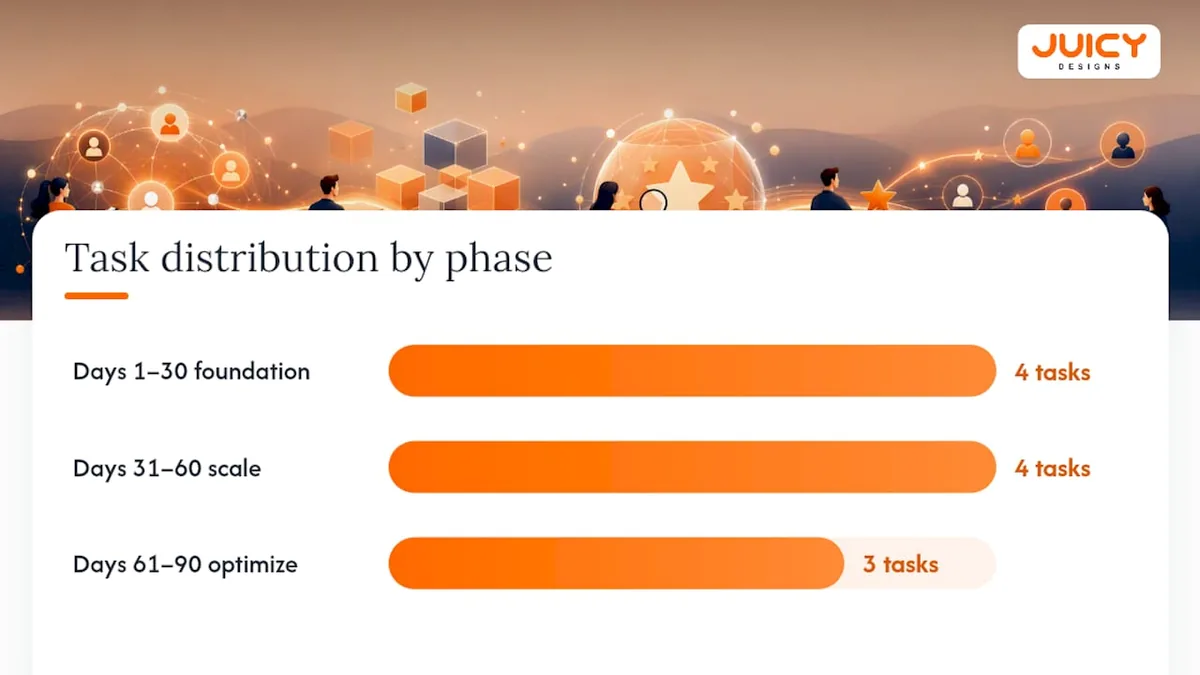
Days 1 to 30, foundation:
- Verify and optimise Google Business Profile and Facebook Page (owner: marketing).
- Draft and approve email, SMS, and in-person ask scripts (owner: marketing, reviewed by operations).
- Print QR cards for till points and packaging (owner: operations).
- Set up one automated post-purchase trigger (owner: marketing or IT).
Days 31 to 60, scale:
- Integrate review requests into POS or e-commerce checkout flow.
- Train frontline staff on the 10-second verbal ask.
- Publish a response and escalation policy for negative reviews (owner: customer service).
- Begin displaying review counts on top-selling product pages.
Days 61 to 90, optimise:
- Build a lightweight weekly dashboard tracking volume, verified share, and response rate.
- Run your first A/B test on review placement or request microcopy.
- Syndicate strongest reviews into at least one active ad campaign.
| Role | Responsibility | Target SLA |
|---|---|---|
| Marketing | Scripts, automation triggers, syndication | Weekly review of volume and sentiment |
| Operations | QR placement, till-point training, POS integration | Monthly integration check |
| Customer service | Negative review response and escalation | 24 to 48 hour response window |
What "done" looks like at each milestone: by day 30, every listing is verified and the first automated ask is live. By day 60, review requests fire automatically from every purchase channel. By day 90, you have a working dashboard and at least one completed test showing measurable impact on conversion.
What retail review programmes actually teach you
Most retailers overestimate how much customers resist being asked for a review, and underestimate how much they resist a clumsy ask. The friction isn't in the request itself, it's in the extra taps, the vague prompt, and the request that arrives a week too late to feel relevant.
Working through review programmes with retail clients, the pattern that shows up again and again is that automation without a genuine moment of satisfaction behind it produces thin, generic reviews.
Pro Tip: Get operations, marketing, and customer service aligned on the same review request calendar before launch. Nothing kills a review programme faster than three departments sending three different asks to the same customer in one week.
Ready to put your review programme on autopilot?
Building this playbook in-house takes real coordination across marketing, operations, and customer service, and most retail teams are already stretched thin without adding review automation, POPIA-compliant scripting, and dashboard tracking to the list. Juicydesigns runs full review-generation programmes as part of a broader retail marketing engine, connecting the review data you collect directly to Google Ads campaigns and SEO work so a strong review doesn't just sit on a listing, it shows up in the ad copy and product pages actually driving sales. Clients working with Juicydesigns see an average return on ad spend of 4.8x, nearly double the industry standard, with founder-led accounts and no long-term lock-in contracts. If you're ready to stop chasing reviews manually and want a system built around your store's actual purchase flow, get in touch with Juicydesigns for a review-generation programme built around your retail operation.
Sources
These sources shaped the recommendations throughout this guide and are worth reading directly if you want to go deeper on any single point.
- Electronic word-of-mouth as market signal: economic impact on consumer satisfaction in South African e-commerce
- Guide to user-generated content | SME South Africa
- Online shopping statistics in South Africa 2025 , Key trends
- Guidance note on direct marketing in terms of the Protection of Personal Information Act (POPIA)
FAQ
What is an example of a good customer review?
A good review is specific rather than generic, it names the product variant, describes the use-case, and mentions a measurable outcome, for example "Used this for a small apartment kitchen, fits perfectly and the finish held up after six months." Detailed reviews like this predict buyer satisfaction better than a bare five-star rating.
What are the 7 qualities of a good customer?
Definitions vary across sources, but the qualities most commonly cited include honesty, clear communication, patience, loyalty, willingness to give feedback, respect for staff, and a fair approach to resolving issues. For a retail review programme, the qualities that matter most are honesty and willingness to give specific, detailed feedback.
What do 5-star review examples look like?
Strong five-star reviews go beyond "Great service!" and include a specific reason for the rating, such as product performance, staff helpfulness, or delivery speed. A five-star review that reads "Ordered on Monday, arrived Wednesday, exactly as described" carries more weight with future buyers than a rating alone.
How do you encourage customers to give reviews?
Ask at the moment of highest satisfaction (right after delivery or a resolved issue), make the process a single tap on mobile, and use a QR code or direct link so customers don't have to search for where to leave feedback. Automated, POPIA-compliant follow-up messages sent through email or SMS/WhatsApp consistently outperform a one-time in-store request alone, and agencies like Juicydesigns build these automated sequences as part of full retail marketing programmes.
Recommended
- Automotive Lead Generation: Dealership Playbook 2026
- How Reviews and Testimonials Grow Your Business | Juicy
- Retail digital marketing best practices for 2026
- Retail Digital Marketing Best Practices for 2026 | Juicy Designs