
Negative Keyword Strategy: Use 1,000 as a Cap, Not a Target
Build a negative keyword strategy with clear triggers, match type choices, and review cadence, while keeping Google Ads' 1,000 keyword account limit in view.
Negative Keyword Strategy: Use 1,000 as a Cap, Not a Target ! Marketer reviewing search terms for exclusions Negative keywords stop your ads from showing on searches that waste your budget, and the fastest way to see the benefit is to open your Search terms report today and add any obviously irrelevant query to a negative list.


TL;DR: Quick Answer
Build a negative keyword strategy with clear triggers, match type choices, and review cadence, while keeping Google Ads' 1,000 keyword account limit in view.
Key takeaways
- Very cheap quotes (under R5,000) almost always exclude copywriting, SEO, custom design and post-launch support
- On-page SEO built into the website at launch costs a fraction of what it costs to retrofit after the site is live
- Hosting, SSL, domain and maintenance add R3,000-R10,000 per year on top of build cost
- E-commerce adds significant cost due to payment gateway integrations, product data, security requirements and checkout UX
- Timeline and client responsiveness directly affect cost: slow feedback rounds extend agency hours

Negative keywords stop your ads from showing on searches that waste your budget, and the fastest way to see the benefit is to open your Search terms report today and add any obviously irrelevant query to a negative list. That one habit protects your cost per click, lifts your click-through rate, and keeps spend pointed at buyers rather than browsers.
TL;DR:
- Use negative broad match only when every listed word signals unwanted intent; phrase match preserves word order, while exact match blocks one query alone.
- Google Ads does not automatically match negative keywords to plurals, synonyms, or misspellings, and queries longer than 16 words may bypass exclusions.
- Google Ads caps account level negative keywords at 1,000, so reserve them for universal exclusions and use shared lists across campaigns for consistency.
- During a 90 day review, consider excluding a query after it spends more than three times your target acquisition cost without converting.
- In Performance Max, negative keywords affect only Search and Shopping inventory; Google recommends brand exclusions for your own brand because they catch close variants.
What negative keywords are and why they matter to your results
A negative keyword tells Google Ads which search terms should never trigger your ad. When someone searches a term you've excluded, your ad simply doesn't enter the auction for that query. That's the whole mechanic, and it's also why negatives are one of the most direct levers you have over wasted spend.
The payoff shows up in three places: fewer clicks from people who were never going to buy, a cleaner click-through rate because your ad only appears for relevant searches, and often a better conversion rate once your traffic matches your offer. You're not paying to educate people who were searching for something else entirely.
There's a planning constraint worth knowing before you build out lists at scale. Google Ads caps account-level negative keywords at 1,000 per account. That sounds generous until you're running several campaigns with aggressive exclusion habits, so it pays to be deliberate about what earns a spot on that list rather than adding every stray term you spot. Our breakdown of how negative keywords stop wasted Google Ads spend covers the mechanics in more depth if you want a fuller picture before you start building lists.
Negative match types: broad, phrase and exact explained
Negative keywords use the same three match types as regular keywords, but they behave in the opposite direction: instead of expanding reach, they narrow it. Getting the match type wrong is one of the quickest ways to either block too much or too little.
Negative broad match excludes a search whenever all the words you've listed appear anywhere in the query, in any order. If you add a negative broad for "free trial," your ad won't show for "trial free consultation" or "consultation about a free trial." It's the bluntest tool, useful when a word or word combination signals intent you never want, but it can catch more than you expect if your terms are common.
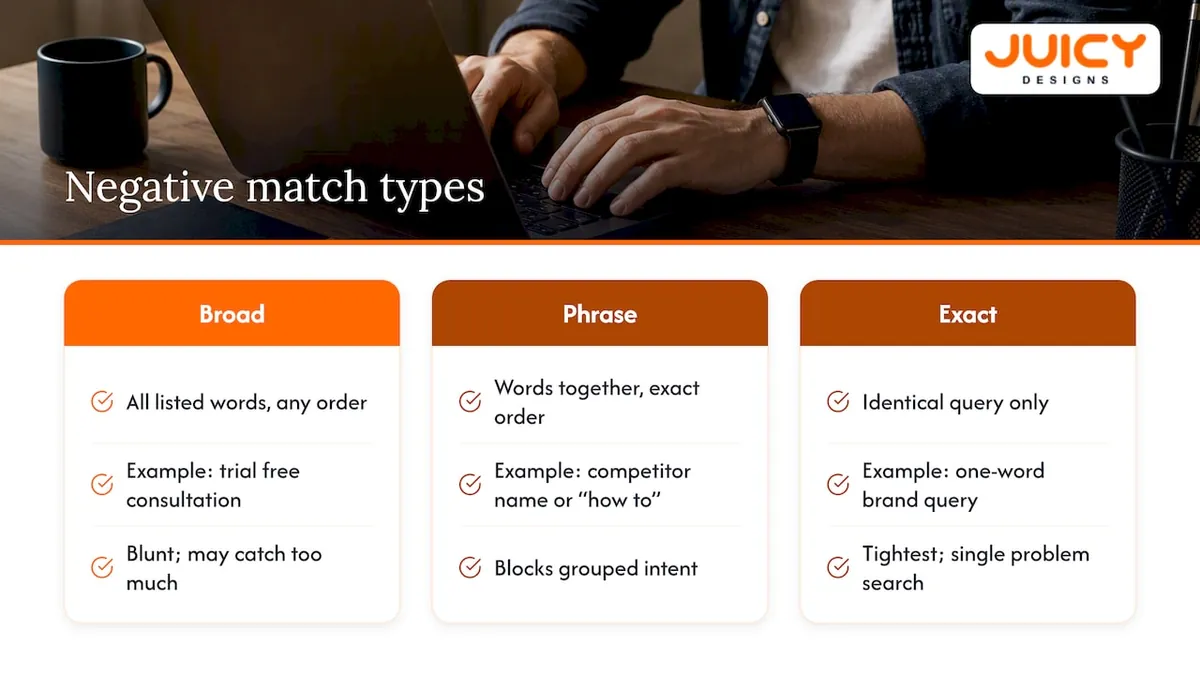
Negative phrase match excludes a search only when your words appear together, in that exact order, anywhere in the query. This is the right choice for blocking a competitor's name or a modifier like "how to," where word order carries the meaning.
Negative exact match blocks only the identical query, nothing more and nothing less. It's the tightest option, ideal for removing a single problem search, such as a one-word brand query that keeps slipping into a non-brand campaign.
One detail trips up a lot of accounts: negative keywords don't follow close-variant matching. Excluding "house" won't stop "houses" from triggering your ad, and it won't catch synonyms or misspellings either. You have to add those variants yourself. Our comparison of broad, phrase and exact match on a small budget walks through how this plays out when every rand of spend needs to count.
Where to apply negatives: account, campaign, ad group and shared lists
Choosing the right scope matters as much as choosing the right match type. Apply a negative too broadly and you risk blocking traffic you actually want; apply it too narrowly and you repeat the same work across every campaign.
Account-level lists suit terms you never want to pay for anywhere, such as "jobs," "free," or anything clearly brand-unsuitable. Remember the 1,000-term ceiling here, so reserve this level for genuinely universal exclusions.
Campaign-level negatives are the right tool for shaping traffic between campaigns, most commonly keeping brand searches out of your non-brand campaign and vice versa.
Ad group-level negatives handle exclusions tied to one specific set of keywords, where a term is irrelevant for that ad group alone but still fine elsewhere in the account.
Shared negative keyword lists let you build a list once and apply it across multiple campaigns, which saves time and keeps your exclusions consistent as the account grows. Google's own guidance on account-level negative keyword lists explains how to build and filter these lists inside the interface.
How to find negative keyword opportunities in your account
Your best source of negative keyword ideas is your own account data, not guesswork. The Search terms report shows you exactly what people typed before clicking your ad, and that's where every serious negative keyword strategy starts.
Open the report and sort for queries with a meaningful number of clicks and zero conversions, or terms that are obviously off-target the moment you read them. From there, a few filters consistently surface the best candidates:
- One-word queries, which are often too broad to signal real intent.
- Branded terms showing up inside non-brand campaigns, a sign your match types are too loose.
- Location terms outside your service area, if location matters to your offer.
- Intent modifiers like "jobs," "careers," or "cheap" that signal a searcher isn't your buyer.
Once you've filtered down to a working list, the bulk workflow is straightforward: filter, select, and add the terms either directly to a campaign or, better, to a shared list you can reuse. Google's own instructions for getting negative keyword ideas from the search terms report note that negatives added this way default to exact match unless you change it, so check the match type before you save.
If you're using AI-assisted or third-party keyword tools to speed up discovery, treat their suggestions as candidates, not final answers. Platforms built for automated keyword and content discovery, such as the workflows described in this piece on AI-driven search and visibility, can surface patterns faster than manual review, but every suggested term still needs a human check against your actual campaign goals before it goes on a list. For a step-by-step walkthrough of pulling this report inside the Ads interface, our guide on reading the Google Ads search terms report covers the clicks you'll make, start to finish.
Setting your aggression level, review cadence and trigger rules
A negative keyword list isn't a one-time cleanup job. Treating it that way is the most common reason accounts either keep leaking budget or quietly choke off good traffic. The strategic framing for 2026 treats negatives as signals you shape deliberately, not maintenance you get to eventually.
Start by tying your aggression level to the account's actual goal. A growth-focused account chasing volume should stay conservative, excluding only terms that are clearly wrong, because overly aggressive negatives can quietly choke off traffic the algorithm would otherwise have found valuable. An account with a capped budget or a strict cost-per-acquisition target can afford to be more aggressive, since the cost of missing a borderline click is lower than the cost of overspending.
On cadence, a 90-day review of your search terms report is a widely recommended baseline: long enough to gather a meaningful amount of data, short enough that you're not sitting on wasted spend for a full quarter before acting.
Concrete trigger rules make this easier to apply consistently. A reasonable starting point, described in this guidance, is to add a term to your negative list when it has cost more than three times your target cost per acquisition with zero conversions over a 90-day window, or when it has accumulated a meaningful number of clicks with no conversions over a shorter window you've set for that account. Adjust both numbers to the client's own goals and budget size rather than applying one rule everywhere.
Match the match type to the job: exact negatives for single-term blocks, phrase negatives for grouped intent like "cheap" or "free," and broad negatives reserved for words that reliably signal the wrong kind of searcher no matter where they appear.
Pro Tip: Write your trigger rules down as an actual policy document, not a mental rule of thumb, so every account review applies the same standard.
Keeping your lists healthy: review, troubleshoot, avoid over-sculpting
A negative keyword list needs upkeep, and most of the problems that show up later trace back to a review that didn't happen on schedule.
- Run your 90-day search terms review on a fixed date, export the results, and update your shared lists rather than editing individual campaigns one by one.
- When a negative doesn't seem to be working, check whether the issue is a close variant, a plural, or a synonym the negative never covered, since negative keywords don't match those automatically.
- Check queries longer than 16 words carefully. Google notes that very long queries can bypass a negative if the matching term falls outside the portion Google evaluates.
- Confirm the negative list is actually applied to the campaign in question. A list that exists but was never attached does nothing.
- Watch for signs of over-sculpting, such as a sudden drop in impressions on keywords that matter without any corresponding gain in conversions. That's a signal to temporarily pull a negative back and reassess.
For accounts with a lot of recurring one-word junk terms, automating that filter and routing everything through a shared list cuts manual work substantially. Logging every change in Google Ads' Change history also makes it far easier to trace a performance shift back to a specific edit.
Performance Max and brand exclusions: what changes
Performance Max campaigns handle negatives differently from standard Search campaigns. Negative keywords in Performance Max apply only to Search and Shopping inventory, not the full range of placements the campaign type can reach.
For blocking your own brand terms specifically, Google recommends brand exclusions over negative keywords, because exclusions are built to catch misspellings and close variants automatically in a way manual negative lists can't match term for term.
That said, negative keywords still earn their place inside Performance Max for anything brand exclusions don't cover: clearly irrelevant queries or brand-unsafe terms that fall outside what the exclusion tool was built to catch.
Our take on building negative keyword lists for clients
We treat negative keyword management as a founder-led discipline, not a box to tick once during setup. Every Google Ads account we manage gets a search terms audit built into the ongoing workflow, with shared negative lists maintained and reviewed rather than left static after launch. That approach is part of our paid search process, which includes ongoing search-term audits and maintenance of shared negative keyword lists. A negative keyword health check is a standard part of the Google Ads audit we offer, so if you want a second set of eyes on your account, that's the easiest place to start.
, Cobus
Get a free Google Ads audit from our team
If reading through search terms reports and building match-type logic isn't how you want to spend your week, we'll do it for you. Our Google Ads audit reviews your search terms report, your existing negative keyword lists, and the match types you're currently relying on, then hands you a clear list of what's costing you money right now.
For ongoing management, our founder-led Google Ads service starts at R6,000 per month through the Local plan, with no long-term contract and no account managers between you and the person doing the work. Get in touch through our contact page or request the audit directly to see what your account is currently leaking.
FAQ
What is a negative keyword example?
A negative keyword is a term you exclude so your ad never shows for it, such as adding "free" as a negative when you sell a paid product. If someone searches "free accounting software" and you've excluded "free," your ad for paid accounting software won't appear for that query.
What is a benefit of negative keywords?
The main benefit is spend efficiency: your budget stops going towards clicks from people searching for something your business doesn't offer. This typically shows up as a better click-through rate and often a stronger conversion rate, since the traffic reaching your ad is more closely matched to your offer.
Can you give me an example of negative marketing?
In the context of search advertising, "negative" refers to negative keywords, which exclude unwanted searches rather than describing a marketing tactic that criticises a competitor. If you're asking about excluding irrelevant traffic, the standard example is a retailer excluding "jobs" or "careers" so job seekers searching for employment don't trigger ads meant for customers.
How do I add a negative keyword in Google Ads?
You can add negative keywords directly from the Search terms report by selecting a query and choosing to add it as a negative, or by going to the Keywords section of a campaign or ad group and adding it manually. Google's own instructions for adding negatives from the search terms report note that terms added this way default to exact match unless you change it.
How often should I review my negative keyword list?
A 90-day review cycle is a commonly recommended starting point, giving you enough search data to spot real patterns without letting wasted spend run unchecked for too long. Some accounts with tighter budgets review more frequently, while high-volume accounts may stick closer to the 90-day mark to avoid reacting to noise.
Recommended
- Negative Keywords: Stop Wasting Google Ads Spend
- How to Do Keyword Research for Google Ads on a Small Budget
- Broad Match vs Phrase Match vs Exact Match on a Small Budget
- How to Lower Your Google Ads Cost Per Click Without Losing Leads