
Marketers: 3 UTM tracking rules that stop GA4 Unassigned
A practical UTM tracking playbook for marketers: enforce the three required fields, align medium values with GA4, use templates, and run a QA checklist.
Every reliable campaign report starts with the same rule: always include `utm_source`, `utm_medium`, and `utm_campaign` on every external link, lock them to a lowercase naming convention, and never touch an internal link with a UTM tag.


TL;DR: Quick Answer
A practical UTM tracking playbook for marketers: enforce the three required fields, align medium values with GA4, use templates, and run a QA checklist.
Every reliable campaign report starts with the same rule: always include utm_source, utm_medium, and utm_campaign on every external link, lock them to a lowercase naming convention, and never touch an internal link with a UTM tag. Everything else in your tracking setup, from GA4 channel groupings to QR codes, builds on that one habit. Get this right and the rest of this guide gives you the templates, governance checklist, and troubleshooting steps to make it stick.
TL;DR:
- Consistently enforce lowercase formatting and use a fixed separator style to maintain a reliable UTM taxonomy across all campaigns.
- Always include utm_source, utm_medium, and utm_campaign on external links; missing any of these can cause attribution data to fall into GA4's Unassigned bucket.
- Use recognised utm_medium values such as cpc, paid_social, email, organic, referral, or qr to ensure proper channel grouping in GA4 reports.
- Test all shortened, redirected, or QR-coded links thoroughly before campaign launch to prevent parameter stripping and attribution loss.
- Implement strict governance by using dropdown menus for UTM values, regularly auditing GA4 data, and validating each link during pre-launch QC.
UTM structure and required parameters explained
UTM parameters are the tags appended to a URL that tell Google Analytics 4 (or any analytics platform) where a visitor came from. There are five standard parameters, but you only need three of them on every single link.
- utm_source: the origin of the traffic, like
google,newsletter, orfacebook. - utm_medium: the channel type, like
cpc,email, ororganic. - utm_campaign: the specific initiative, like
black-friday-2026. - utm_term: reserved for paid search keywords.
- utm_content: differentiates creatives, ads, or placements within the same campaign.
Practitioner consensus, including Bitly's enterprise UTM guidance, treats source, medium, and campaign as the non-negotiable trio because GA4 cannot build a coherent channel report without them. Compare these two links:
yoursite.co.za/promo?utm_source=facebook&utm_medium=paid_social&utm_campaign=summer-sale
yoursite.co.za/promo?utm_source=FB&utm_campaign=summer_sale
The second link is missing utm_medium entirely and uses an inconsistent source label. That single gap is often enough to push otherwise-valuable traffic into GA4's Unassigned bucket, which we will unpack shortly.
Naming conventions: build a taxonomy that survives a quarter
A UTM programme only stays useful if the whole team tags links the same way, every time. That means agreeing on formatting rules before your first campaign launches, not after your reports start looking messy.
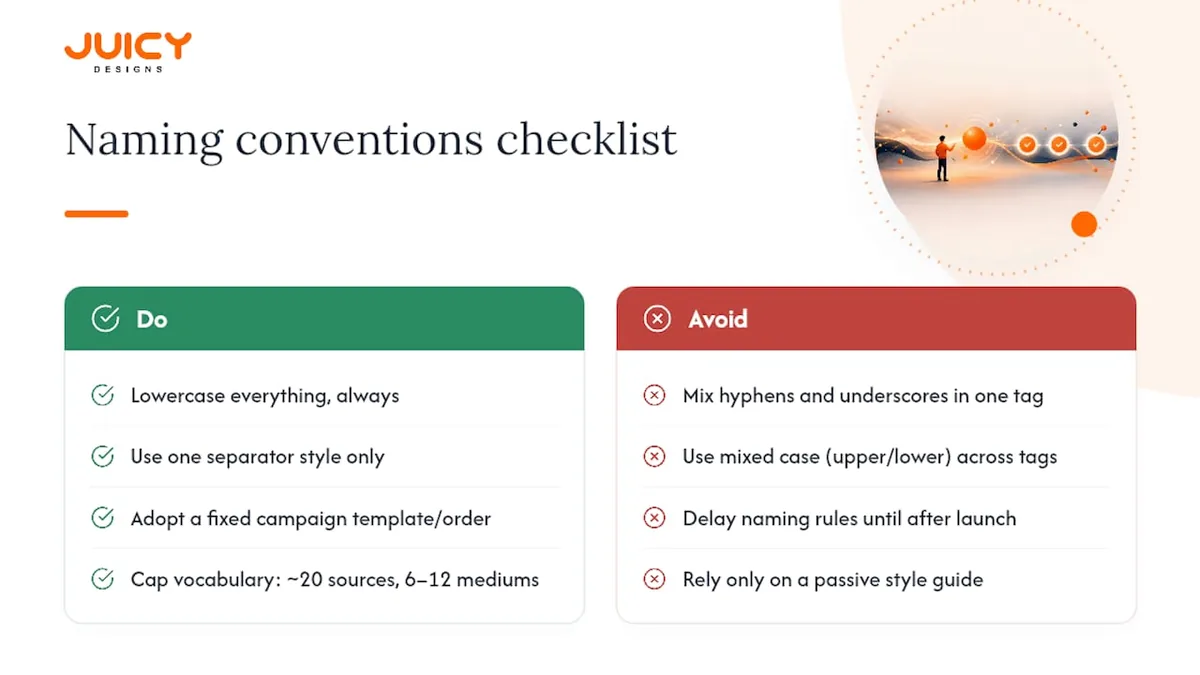
Lowercase everything, always. GA4 treats Google and google as two different sources, which quietly splits your data. Enforcing lowercase at creation time is one of the governance patterns Terminus recommends for keeping tracking trustworthy over time.
Pick one separator and never mix it. Use hyphens between words within a value (black-friday) and underscores to separate fields if your naming template needs both (2026_q1_launch-promo). Mixing both styles inside the same tag is where taxonomies quietly rot.
Adopt a starter campaign template. A structure like {year}-{quarter}-{programme}-{tactic} gives you something copyable from day one: 2026-q1-newlaunch-retargeting. The order of fields matters more than the exact fields you choose, so pick a sequence and keep it fixed.
Cap your controlled vocabulary. Aim for roughly 20 approved source values and 6 to 12 medium values, stored in a shared register (a spreadsheet or a dedicated UTM builder tool) that every campaign owner references before publishing a link.
Pro Tip: Build your allowed-values list as a dropdown in whatever tool your team uses to generate links. A dropdown prevents typos far more reliably than a style guide nobody rereads.
Aligning UTMs with GA4 channel grouping and attribution
GA4 assigns every session to a Default Channel Grouping based largely on utm_medium. Get the medium value wrong and that traffic lands in Unassigned, the graveyard of attribution data that makes budget conversations impossible to win.
Stick to medium values GA4 actually recognises:
cpcfor paid searchpaid_socialfor paid social campaignsemailfor newsletters and lifecycle sendsorganicreserved for genuinely unpaid discovery (GA4 usually detects this automatically, so hand-tagging it is rarely necessary)referralfor partner or affiliate linksqrfor offline QR code campaigns
Google Ads auto-tags with gclid by default, which is why many teams also apply a Final URL Suffix at the account or campaign level rather than manually tagging every ad. This keeps your paid search UTMs consistent without editing thousands of individual URLs.
For any campaign you expect to rename, resize, or report cost data against later, add utm_id. It gives the campaign a stable identifier that survives a name change and supports cost-data import into GA4, something a text-based utm_campaign value alone cannot reliably do.
When to use utm_term, utm_content, and utm_id
The optional parameters exist to answer narrower questions than "which channel sent this visitor." Use them for that purpose only, or they start polluting the same reports they're meant to sharpen.
- utm_term: reserve it exclusively for paid search keywords. Repurposing it for audience segments or creative names breaks the convention other analysts expect when they open your reports.
- utm_content: use it to tell creatives, placements, or ad variants apart inside one campaign, with a simple local convention like
hero-bannerversuscarousel-ad. - utm_id: attach a unique ID to every paid campaign to support cost import and to keep identity stable if the campaign name changes mid-flight.
Most ad platforms support dynamic macros so these values populate automatically instead of relying on manual entry. Google Ads offers {campaignid}, {adgroupid}, and {keyword}; Meta offers {{campaign.name}} and {{ad.id}}; TikTok offers similar placeholders in its URL suffix settings. Terminus recommends macros over static values precisely because they stay accurate as campaigns scale.
Pro Tip: Test your macros on a single ad before applying them account-wide. A malformed macro can silently pass a literal placeholder string like "{{ad.id}}" into GA4 instead of the real value.
Link handling: short links, redirects, QR codes, and internal links
UTMs are just query strings, which means they are fragile in the wrong hands. A misconfigured redirect or shortener can strip them entirely before the visitor ever lands on your site.
- Test every short link before launch. Click it yourself, follow the full redirect chain, and confirm the final landing URL still carries all your parameters intact.
- Watch for double redirects. A link that passes through two or three hops, common with social platforms and ad networks, is where UTMs most often get dropped or mangled.
- Tag QR codes the same way you'd tag any external link. Encode the full UTM URL into the code, set
utm_medium=qr, and use a descriptive source likeevent-boothorproduct-packagingso you can tell one physical placement from another. - Never tag internal links. A UTM tag on a link from your homepage to your pricing page overwrites the visitor's original session source with whatever the internal link says, destroying your real attribution data. Track internal navigation with GA4 events instead, not UTMs.
Pre-launch QA and governance that actually holds
Most UTM programmes don't fail because nobody knew the rules. They fail because nobody checked the rules got followed before the link went live.
Run every campaign through the same short checklist before publishing:
- Confirm all three required parameters are present and correctly spelt.
- Confirm every value is lowercase and uses the agreed separator.
- Click the final link and verify it lands where intended with parameters intact.
- Cross-check the campaign name against your UTM register for duplicates or near-duplicates.
Keep a single source-of-truth register, whether that's a shared spreadsheet or a dedicated builder tool, and enforce allowed values at the point of creation rather than relying on training alone. Training fades. A dropdown that rejects a malformed tag doesn't.
Review the taxonomy itself periodically, and run a monthly audit as a practical minimum for active programmes, scanning GA4 for unfamiliar source and medium combinations.
Pro Tip: Version your naming convention document. When you add a new medium value or retire an old one, note the date. It saves enormous confusion when someone asks why campaigns from 18 months ago look different.
Scaling UTM tagging techniques across a growing team
A single marketer can manage UTMs in their head. A team of ten running campaigns across five platforms cannot, and trying to do so is how naming conventions collapse.
- Use dynamic macros wherever a platform supports them, particularly for
utm_contentandutm_idon Google Ads, Meta, and TikTok, so values populate consistently without manual entry. - Centralise link generation through a shared builder rather than letting each campaign owner construct URLs by hand in a text editor.
- Batch-generate links via CSV for large campaigns with many creatives or placements: list your fixed campaign fields in one column, vary only
utm_contentorutm_termacross rows, and generate the full set at once. - Note server-side tagging as a capture improvement, not a strategy change. It extends cookie persistence under browser tracking restrictions but doesn't alter which UTM parameters you use or how you name them.
If your team is already stretched thin on execution, working with a partner that treats Google Analytics consulting as part of a broader measurement setup can shortcut months of trial and error.
How to check your UTM tracking best practices are working in GA4
Setting up UTMs correctly is only half the job. You need a habit of checking the data actually arrived the way you expected.
- Open GA4's Traffic Acquisition report and scan the Session Default Channel Grouping. A growing Unassigned bucket almost always traces back to a missing or non-standard
utm_mediumvalue. - Check for duplicate sources that should be one, like
Googleandgoogleappearing as separate rows, a sign your lowercase rule isn't being enforced. - Validate a single new link in GA4's Realtime report immediately after publishing. Click it yourself and confirm the source, medium, and campaign appear correctly within a minute or two.
- If a parameter is missing, retrace the link's path: check the original tagged URL first, then the shortener, then any redirect rule, since redirect chains and scanners are common places attribution quietly breaks.
For teams also wrestling with unusual referral patterns from AI assistants like ChatGPT or Perplexity, it's worth reviewing how those sources should be tracked and classified in GA4 so they don't get miscategorised alongside your UTM campaigns.
Common mistakes and a fast troubleshooting checklist
Most UTM problems trace back to a small, repeatable set of causes. Seven mistakes account for the bulk of broken GA4 reporting: case inconsistency, internal link tagging, spaces or unencoded characters, vague campaign names, non-standard medium values, redirect issues, and manual link building without any tooling.
- Upper and lowercase mixing. Fix it by enforcing lowercase at the point of link creation, not after the fact.
- Tagging internal links. This overwrites the visitor's true session source. Remove the UTM and track the click as a GA4 event instead.
- Non-standard medium values. Anything outside your approved list risks landing in Unassigned. Standardise against the list in the GA4 alignment section above.
- Shorteners or redirects stripping parameters. Test every link end-to-end before it goes live, and retest if the destination URL changes later.
- Vague or inconsistent campaign names. Route every link through your naming template so no one improvises a one-off label under deadline pressure.
Juicy Designs: how disciplined UTM tracking shows up in results
We treat UTM tracking as infrastructure, not an afterthought bolted on before a campaign launches. Every link a client campaign generates runs through a documented naming convention, a pre-launch QA pass, and a monthly review against GA4's channel groupings.
- We enforce consistent lowercase, templated naming across every campaign we manage to keep reports comparable month over month.
- We validate every shortened or redirected link before it reaches an ad, an email, or a QR code, rather than discovering a broken parameter after spend has already gone out the door.
- This discipline supports the outcomes we report to clients, including strong return on ad spend and measurable increases in qualified leads, outcomes tied directly to knowing exactly which channel and creative drove which result.
If your own tracking setup feels more improvised than governed, our digital marketing services team can help you rebuild it properly, and our Google Ads management work often starts with exactly this kind of UTM cleanup.
The gap between UTM theory and UTM discipline
Most UTM advice online reads like a parameter glossary, not a working system. The five fields get defined, a couple of examples get shown, and the article ends there. That's not where UTM programmes actually break.

They break in governance: the campaign manager who tags a link at 4pm on a Friday without checking the register, the intern who capitalises Email because it looked tidier, the redirect that quietly strips a parameter nobody tested. The technical rules in this guide are simple enough to learn in twenty minutes. Getting a team of five or fifteen people to follow them consistently for a year is the actual challenge, and it's the part most guides skip entirely.
If you take one thing from this: enforcement beats education. A dropdown that rejects a malformed tag will outperform a training deck every time, because training fades and interfaces don't. Build the constraint into your tooling before you worry about writing the perfect naming convention document, because a mediocre convention that's actually followed beats a perfect one that gets ignored by the third campaign.
, Cobus
Sources
For deeper protocol detail, Bitly's enterprise UTM guide covers link shortening at scale, and the Terminus UTM tagging guide is worth bookmarking for governance patterns. The UTM Generator best-practices guide is a solid reference for GA4 channel mapping specifically.
On the Juicy Designs side, our digital marketing glossary defines related terms like channel grouping and attribution windows, and our lead source tracking guide walks through mapping UTM data into a CRM once it leaves GA4.
- UTM Parameters Guide for Enterprise Campaigns
- The 2026 UTM Tagging Guide: A Complete, Dated Reference for Marketing Teams - Terminus Blog
- 7 UTM Mistakes That Break Your GA4 Data (And How To Fix)
FAQ
What are the five UTM parameters?
They are utm_source, utm_medium, utm_campaign, utm_term, and utm_content. Source, medium, and campaign are required on every link; term and content are situational, used mainly for paid search keywords and creative differentiation.
What are the best practices for using UTM tracking?
Always include the three required parameters, enforce a lowercase and consistently separated naming convention, align utm_medium values with GA4's channel groupings, and never apply UTM tags to internal links.
What are some common UTM mistakes?
The most frequent errors are inconsistent capitalisation, tagging internal links, using non-standard medium values that land in GA4's Unassigned bucket, and shorteners or redirects that strip parameters before they reach the landing page.
How do I implement UTM tracking?
Start with a documented naming template and a controlled vocabulary for sources and mediums, generate links through a shared builder or spreadsheet, run a pre-launch QA check on every link, and audit your GA4 channel data monthly to catch drift early.
Recommended
- How Do I Track Where My Leads Are Actually Coming From?
- How to Set Up Google Ads Conversion Tracking for Calls and Enquiries
- How to Link Google Ads to GA4 and Google Business Profile
- Google Tag Manager: what it does and why it matters